Table of Contents
ToggleSetting up a home gym doesn’t mean compromising on technology or results. The Speediance Smart Home Gym brings commercial-grade fitness equipment and intelligent coaching into your living space, blending hardware durability with app-driven workouts. Whether you’re squeezing a fitness station into a spare bedroom or dedicating a full garage to training, this system adapts to your space and goals. This guide walks you through what makes Speediance tick, how to install it, and how to design your home gym around it, no contractor needed, but some smart planning required.
Key Takeaways
- The Speediance Smart Home Gym combines modular strength-training equipment with AI-powered form correction and motion tracking, making data-driven coaching accessible without a commercial gym membership.
- Installation requires minimal structural work—just basic hand tools, a standard outlet, and 8×6 feet of floor space, taking most DIYers 1–2 hours to complete.
- Proper space setup matters as much as the equipment itself: use rubber mats for floor protection, install bright LED lighting, maintain 40–60% humidity, and keep a mirror nearby for form feedback.
- The connected app enforces progressive overload by tracking weight and rep data over time, automatically suggesting heavier loads and integrating with fitness apps like Apple Health.
- Weekly maintenance—wiping down the frame and sensors—and quarterly sensor calibration prevent rust, electrical issues, and form-tracking drift, ensuring long-term reliability.
- Speediance’s biofeedback loop flags form issues mid-set before they become injuries, distinguishing it from traditional home gym equipment through real-time motion sensor alerts.
What Is the Speediance Smart Home Gym?
The Speediance Smart Home Gym is an integrated fitness system that combines modular strength-training equipment with real-time motion tracking and personalized workout guidance through a connected app. Unlike a collection of dumbbells or machines, Speediance uses AI-powered form correction and adaptive resistance to meet users where they are, whether they’re a beginner learning proper squat mechanics or an athlete fine-tuning explosive movements.
The core setup typically includes a main training unit with adjustable resistance (usually magnetic or electromagnetic), a mobile app for workout programming, and sensors that track rep count, range of motion, and tempo. The equipment footprint is compact, think of it as taking up roughly the space of a compact treadmill or power rack, making it realistic for apartment dwellers or those working with limited square footage.
What sets it apart from traditional home gym staples is the biofeedback loop. Sensors don’t just count reps: they flag form issues mid-set. If your knee tracking drifts or your range of motion shortens on successive reps, the app alerts you, correcting problems before they become injuries.
Key Features That Make It Stand Out
Connected Technology and App Integration
The app is the nervous system of your home gym. It pairs with your equipment via Bluetooth and displays real-time metrics, weight lifted, reps completed, rest time, form quality, on your phone or tablet. Workouts are pre-programmed by sport-specific coaches (strength, power, conditioning, mobility) and adapt based on your performance history.
Progressive overload, the foundation of strength gains, becomes more scientific. The system tracks which weights you lifted for which exercises across weeks and months, then automatically suggests incrementally heavier loads or higher rep counts. Rest timer between sets? The app enforces it, keeping you honest if you rush back too quickly.
Integration with fitness apps like Apple Health or Strava means your Speediance data syncs into your broader fitness ecosystem. Logging a Speediance session doesn’t mean manually recording it elsewhere. And if you travel, workouts sync to your account, so your progress history follows you. Smart home devices have, and Speediance extends that convenience to gym performance.
One practical note: connectivity requires a stable Wi-Fi signal in or near your gym space. If your router is three rooms away with thick walls between, consider a mesh network or extender to avoid disconnects mid-session.
Installation and Setup for Your Home
Installation is straightforward, no structural anchoring or wall studs required for most setups, though you should verify your equipment’s footprint and weight specifications against your floor’s load capacity. Here’s the practical breakdown:
Before You Buy
- Measure your intended space (length, width, height clearance). Most Speediance units need at least 8 × 6 feet of dedicated floor space, with an additional 2 feet of clearance behind and to the sides for safe movement.
- Check your floor. If you’re placing this on a finished hardwood, tile, or carpet, ensure the material can handle point loads (concentrated weight). A rubber mat underneath spreads weight and protects your floor, a standard ¾-inch gym mat works fine.
- Verify electrical access. The unit needs a standard 120V outlet within reasonable reach (a heavy-duty extension cord is acceptable if necessary, though a dedicated outlet closer to the equipment is preferable).
Installation Steps
- Unbox and inspect for shipping damage. Check that all bolts, cables, and connection points are intact.
- Assemble the main frame according to the manual. This typically takes 1–2 hours and requires basic hand tools (wrench, Phillips screwdriver).
- Attach the sensor array (usually magnetic or optical sensors affixed to moving parts) and calibrate per instructions. Calibration ensures accurate rep counting and form tracking, don’t skip this step.
- Download the app and connect via Bluetooth. The system will prompt you through initial setup: height, weight, experience level, and fitness goals.
- Run a short test workout (usually 5–10 reps of a basic movement) to confirm sensors are responsive.
One important detail: if your space has significant temperature swings (unheated garage in winter, for example), let the equipment acclimate to room temperature for a few hours before first use. Sensors and electronics perform better at stable temperatures. Many DIYers overlook this and encounter calibration drift later.
Designing Your Home Gym Space Around Speediance
A functional home gym is as much about the space around the equipment as it is about the equipment itself. Speediance works best in a dedicated area, but doesn’t require a finished basement or fancy studio setup.
Flooring and Shock Absorption
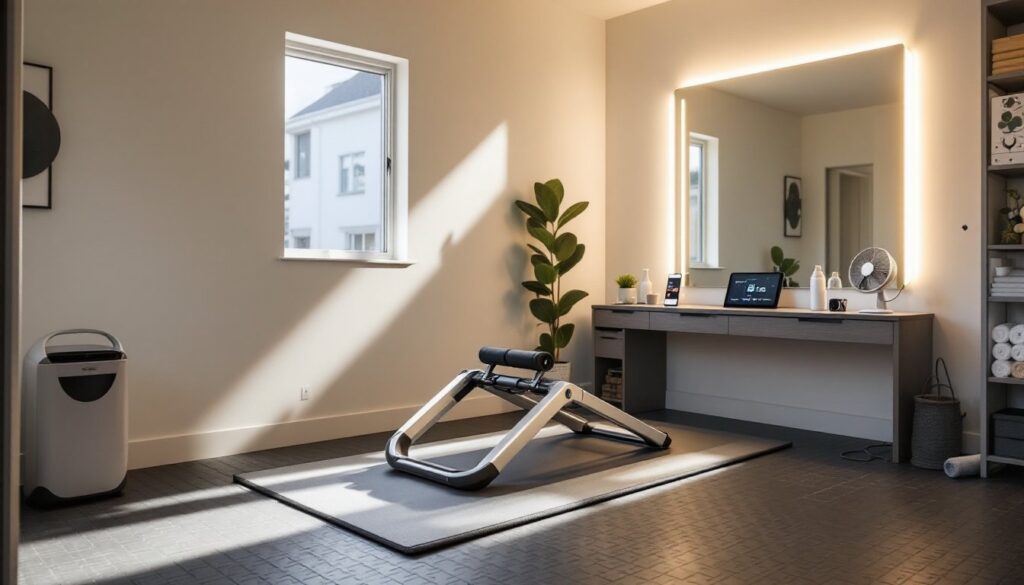
Place your equipment on a rubber or foam mat (½ to ¾ inches thick, designed for weight training). This dampens vibration, protects your floor, and gives you a visual boundary, psychologically important when your gym shares a room with laundry or storage. Rubber rolls or interlocking tiles both work: avoid thick carpet, which compresses unevenly and throws off your stability.
Lighting
Good lighting prevents form errors and makes the app screen readable. Install bright, flicker-free overhead lights (LED is best for both energy and visibility). A dedicated task light pointed at the app display helps you read metrics in dimmer conditions without straining your neck.
Climate Control
Sweat damages electronics over time. If your gym space is humid (basement rec room, attached garage in summer), run a dehumidifier or crack a window during and after workouts. Target 40–60% relative humidity. A small fan also improves air circulation and keeps you from overheating during high-intensity sessions.
Wall Space
A mirror opposite the equipment gives you form feedback independent of the app, always helpful as a sanity check. You’ll also want clear wall space nearby for mounting a smart home device like a smart speaker if you want voice control or audio coaching. Many users appreciate voice cues during intense sets when looking at a phone isn’t practical.
Storage
Keep water bottles, a towel, and your phone charger within arm’s reach. A small wall shelf or rolling cart keeps the space organized and prevents clutter from encroaching into your training area.
Maintenance Tips to Keep It Running Smoothly
The Speediance system is robust, but sensors and electronics benefit from preventive care. Here’s what actually matters:
Weekly
Wipe down the frame and moving parts with a damp (not soaking) microfiber cloth after use. Sweat is corrosive: letting it dry on metal accelerates rust, especially on any exposed bolts or cables. Pay attention to sensor housings, moisture can degrade optical or magnetic sensors over time.
Monthly
Inspect all bolts and fasteners, tightening any that have loosened from vibration and use. A loose bolt isn’t a structural emergency initially, but it compounds over months of regular training. Use an adjustable wrench or the tool kit that came with the equipment, don’t over-torque, or you risk stripping threads.
Check your electrical cord and plug for signs of fraying or damage. If you’re using an extension cord, confirm it’s rated for the amperage your equipment draws (usually listed in the manual or on the back of the unit).
Quarterly
Calibrate the sensors again, following the app’s built-in calibration workflow. Over time, sensor sensitivity can drift slightly, especially if there’s been temperature fluctuation or physical bumping. Recalibration takes 2–3 minutes and ensures form tracking stays accurate.
If you use the equipment outdoors or in a damp environment (enclosed porch, garage without climate control), consider a protective cover when not in use. A breathable gym equipment cover prevents dust and moisture accumulation without trapping condensation underneath.
Common Fixes
If the app loses Bluetooth connection mid-workout, move your phone closer or restart the Bluetooth connection, interference from other devices (cordless phones, microwaves) is usually the culprit. Restarting the equipment’s power cycle (turning it off for 30 seconds, then back on) resolves most sensor glitches. If a sensor consistently fails to respond, check that it’s firmly seated and not blocked by debris or dust. Most sensor issues are contact or alignment problems, not dead sensors.
Consult the manual for warranty details, but basic maintenance like bolt-tightening and sensor cleaning won’t void it. If you encounter electrical faults (the unit won’t power on, or lights flicker irregularly), stop using it and contact the manufacturer, don’t troubleshoot live electrical issues yourself. Smart home device setup and optimization applies here: many modern fitness systems benefit from regular software updates, so check the app for firmware patches quarterly.
Conclusion
The Speediance Smart Home Gym collapses the distance between commercial training and home convenience. It’s not a gimmick, the form tracking, adaptive programming, and data logging are genuinely useful if you’re serious about consistent progress. The installation itself is within reach of any DIY-minded person with basic tools and an afternoon free. Real work comes in designing your space around it: proper flooring, lighting, climate control, and a clear training zone make the difference between a piece of equipment gathering dust and a system you actually use. Maintain it regularly, keep sensors clean, and the hardware will outlast most home gyms. Whether you’re building your first fitness space or upgrading an existing one, Speediance is a solid choice for homeowners who want data-driven coaching without a commercial gym membership.